The version below turns one topic into an editable Google Doc through Make.com. A request comes in with the topic, audience, and tone. The OpenAI step writes the draft. Make checks the response and sends the content to Google Docs. I keep the document itself as the handoff point for editing because that is where comments, rewrites, and approvals already happen.
The part I fixed first was the output
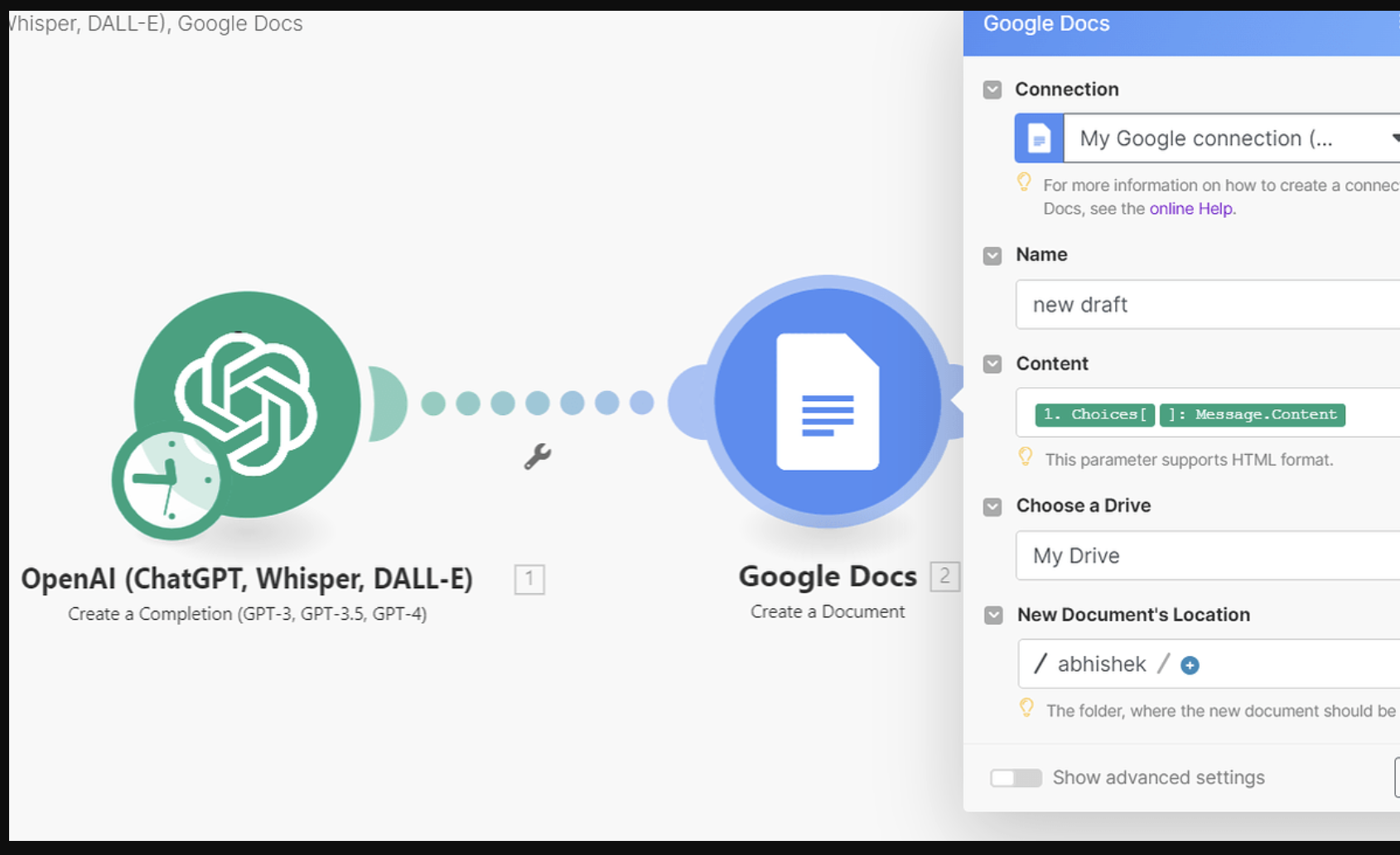
First thing was - ask for a blog post and pass answer into the Google Docs. That creates a document. Headings arrive as Markdown. A title may be repeated inside the body. A model can add an introduction, then another introduction, then a conclusion with a heading I did not expect. The text are fine and the document still needs ten minutes of cleanup.
I stopped trying to parse a free-form answer after that. The model gets a small output contract instead. It returns a title, a meta description, an introduction, then section blocks with fixed markers. I use plain markers because Make can split plain text with fewer surprises than it can with mixed Markdown. Google Docs can then receive actual paragraph styles through the Docs API
For the build shown here I use this format:
TITLE: The article title
META: The meta description

##INTRO##
Introduction paragraphs...

##H2## First section
Section text...

##H2## Second section
Section text...

##H2## Final section
Closing text...
The exact number of sections is less important than the consistency. I normally keep four to six main sections for a normal draft. When the topic needs a different shape, I change the section count. I do not force every topic into the same article.
The prompt I put into the OpenAI step
I keep the instructions short enough to maintain. Long prompts look impressive and often become a second piece of software that nobody wants to edit.
You write a blog draft from the topic supplied by the user.

Return exactly:

TITLE: [title]
META: [meta description]

##INTRO##
[introduction]

##H2## [heading]
[body]

Repeat the H2 block for the rest of the article.

Rules:
- Do not use Markdown headings.
- Do not add text before TITLE.
- Keep the title on one line.
- Keep META below 160 characters.
- Use clear headings and normal paragraphs.
- Do not invent statistics or sources.
- If a claim needs verification, flag it for review.
- Return only the draft in this format.
I also pass the audience and tone with the topic. “Standing desks” is too broad by itself. “Standing desks for remote workers in small home offices” gives the model a usable reader in mind. A technical buyer and a beginner should not receive the same draft.
I keep the input small and predictable
The automation starts with a webhook because it is easy to test and easy to connect to a form, spreadsheet, internal tool, or another automation later. The incoming JSON can stay this small:
{
  "topic": "How to choose a standing desk for a small home office",
  "audience": "remote workers with limited space",
  "tone": "helpful and direct"
}
Make turns those three values into fields I can map into the OpenAI module. Make has been updating its OpenAI app, and current versions include newer response-oriented modules and current OpenAI model support. Model selection was inside the Make module. That makes the automation easier to maintain when available models change.
For a batch workflow, I use the same three fields in a Google Sheet. One row is one draft request. The important column is usually Status. A row starts as Queue, Make picks it up, then the row gets changed to Draft Created with the Google Docs URL.
The OpenAI step is where I control the draft
I used to spend more time changing the model settings than changing the prompt. That was backwards. For this kind of job, the prompt has a larger effect on consistency than a small temperature change.
In Make, add the current OpenAI response or completion module available in your account, then map topic, audience, and tone into the user message. Keep the system instructions separate. That makes later edits safer because the content request can change while the output contract stays the same.
I also set a target length inside the prompt instead of trying to control it only with output token limits. The token limit is there to stop runaway output. The prompt tells the model what a normal draft looks like.
For a 1,500-word article, there is another useful check I add before Google Docs. The response should contain a title, a meta line, an intro marker, and at least the minimum number of sections. I check those values before writing anything to the document. A short or malformed response gets sent to a review path instead of producing a half-finished Doc.
Parsing the answer in Make
The first value I pull out is the title. The second is the meta description. Then I split the body on the section markers.
For a small workflow, Make's text tools are enough. I look for TITLE:, META:, ##INTRO##, and ##H2##. I keep the marker names unique so a normal sentence cannot accidentally trigger the parser.
TITLE: (.+)
META: (.+)

##INTRO##([\s\S]*?)(?=##H2##|$)

##H2## (.+?)\n([\s\S]*?)(?=##H2##|$)
I do not try to make one giant regular expression that understands the whole article. When the pattern becomes too clever, the next prompt change breaks it. Four small checks are easier to inspect.
There is also a useful test here that costs almost nothing. Add a bad sample on purpose. Remove the intro marker. Remove one H2 marker. Put an extra line before TITLE. See what the parser does. That tells you much more than testing one clean response.
Google Docs is where the automation starts to feel finished
Creating the document is easy. Creating a document that an editor can use is a different amount of work.
Google's Docs API gives you documents.create for a blank document and documents.batchUpdate for inserting and formatting content. Paragraph styles such as Heading 2 can be applied with updateParagraphStyle. The API also processes a batch of requests together, which is useful when I need to add several sections and formatting changes in one call.
I create the document first, keep the returned document ID, then send the content through the Docs API. I keep this as a Docs API write when the files are going to editors. A heading should be a real Heading 2 paragraph in Google Docs. It should not be text that happens to start with ##.
The document request
The basic request looks like this:
POST
https://docs.googleapis.com/v1/documents/{{documentId}}:batchUpdate

{
  "requests": [
    {
      "insertText": {
        "location": { "index": 1 },
        "text": "{{sectionHeading}}\n"
      }
    },
    {
      "updateParagraphStyle": {
        "range": {
          "startIndex": 1,
          "endIndex": {{headingEndIndex}}
        },
        "paragraphStyle": {
          "namedStyleType": "HEADING_2"
        },
        "fields": "namedStyleType"
      }
    }
  ]
}
The document index is the part that usually causes trouble. Google measures ranges in UTF-16 code units, and every insertion changes the later positions. The Docs API documentation calls out those index rules and shows how insert operations work.
I avoid making one API request for every paragraph. I build the complete request list and send it in one batchUpdate call where possible. Google specifically recommends batching requests when possible because it saves quota and improves performance.
The index problem is where I changed the build
Suppose the first heading is 42 characters long. I insert it, style its range, then insert the next paragraph. That shifts every later index. Do this for five sections and it becomes easy to reference the wrong range.
I fixed that by building the requests in document order and calculating each start position from the text that has already been added. In a small article, the calculation is manageable inside Make. For larger documents, I prefer one prepared request array rather than a chain of API calls.
Another option is to create a template with placeholders and replace those placeholders with generated text. Google documents a merge pattern built around copying a template and using ReplaceAllTextRequest. That can be easier when the document needs a fixed cover page, standard notes, or a review block at the top.
What I check before I let the Doc reach an editor
There are four checks I keep before the final Google Docs step. The title cannot be empty. The response needs an intro. There should be more than one main section for a normal article. The body needs enough text to look like a real draft.
I don't use one universal character count as a quality score. A short technical note can be useful. A missing 1,000 words in a long-form draft is a different issue. The check is there to catch obvious failures such as an empty response, a parser miss, or a model answer that only contains two lines.
For a malformed response, I route the raw output to an email or Slack alert and stop the document creation. This is easier to inspect than opening a half-filled document and trying to work out which stage failed.
The editorial step stays in the process
I keep the human review stage after the Google Doc is created. The document arrives with the topic, title, draft, and metadata already in place. An editor can then cut sections, add sources, check claims, change the angle, and rewrite anything that sounds generic.
The automation has no way to know that a product price changed yesterday or that a statistic in the draft came from an old report. OpenAI can produce fluent text without verifying every claim. The workflow should send the draft to review instead of quietly moving it toward publication.
For a publishing team, I also add the document URL back into the queue. The sheet can contain:
Topic | Audience | Tone | Status | Google Doc

Standing desk guide | Remote workers | Direct | Draft Created | docs.google.com/...
That small change saves the editor from hunting through Drive for the new file.
I use a different path for batch generation
When the queue has ten or twenty topics, I do not send the whole batch through one long chain. I let Make pick rows from the sheet and process them one at a time. After each finished document, the row gets updated with the new status and document URL.
This gives me an easy recovery point. If the seventh topic fails, the first six rows already contain their documents. I can fix the seventh row and run it again. The queue also tells me which topics are waiting, which are done, and which need a person to inspect the output.
Current Make updates also include newer OpenAI modules and model support, so I keep the OpenAI step isolated from the rest of the workflow. That makes it easier to change the model later without rebuilding the document logic.
A small cost calculation I keep handy
AI cost changes with the model and the amount of input and output text. I don't use the old fixed prices from many Make tutorials because those tables age quickly. I calculate the monthly cost from actual token usage instead.
For example, suppose one article uses 2,500 input tokens and 2,000 output tokens. At 100 drafts, that is 250,000 input tokens and 200,000 output tokens. Plug the current model's published input and output prices into those numbers and you have a useful estimate before the workflow goes live.
There is a second cost: Make operations. If one run uses six modules and you generate 100 drafts, that is roughly 600 module executions before retries and any extra branches. The cleanest way to control this is to remove unnecessary modules. A parser, validation branch, document creation step, and one batch API call can be enough for a lot of teams.
Three tests I run before calling it ready
I test a normal topic first. Then I send a topic with a long title and special characters. Then I send a request that is likely to produce a shorter answer. The first test checks the happy path. The second exposes text and index problems. The third checks the validation route.
I also change the prompt after the first successful run. This sounds odd, but it catches a useful maintenance problem. The system should survive small changes to wording without the parser falling apart. If one prompt edit breaks the Google Doc step, the output contract is too fragile.
Google's batch update requests are applied atomically, so an invalid request can cause the whole update to fail. That is another reason I validate the content and build one request array carefully before sending it.
Where I stop adding automation
I don't add another AI step just because it is available. A second model call for SEO metadata can be useful. A third call to rewrite every paragraph in a different tone often adds cost without improving the final document enough to justify it.
I also keep research outside this first pipeline. A draft generator and a research system are two different jobs. The draft pipeline can create the document and flag claims for review. A separate research step can fetch sources, store them with the topic, and give the writer material to check. Keeping those jobs apart makes debugging much easier.
For a small content team, this setup is enough: a queue, an AI writing step, a validation check, one Google Doc, and a link back to the queue. For a large publishing operation, add source collection, approval states, logging, retries, and a database of completed topics.
The version I keep
The final automation is not huge:
Topic Queue
   ↓
Make Webhook or Google Sheets
   ↓
OpenAI response
   ↓
Output checks
   ↓
Text parsing
   ↓
Google Docs create
   ↓
Google Docs batchUpdate
   ↓
Status + document link
The useful part is the handoff. A topic arrives, the draft is created in the same place the team already edits, and the queue records the document link. The AI step handles the first draft. The editor handles facts, sources, angle, examples, tone, and the final version.
I keep the workflow at that size until there is a real reason to add another piece. The more parts sit between the topic and the editor, the more places there are for a content change to break the automation. A clean queue and a clean Google Doc usually give me more value than another dashboard.